
Keep tabs on your life
With Microsoft OneNote 2010 you can collect and organize everything you need notes, photos, videos, and web links for any project you are working on. OneNote keeps the information you need at your fingertips and, with powerful search capabilities, you can easily find exactly what you are looking for. Toss those paper based notebooks in the recycling bin, you’ve got a digital notebook now!
What’s this about a digital notebook?
OneNote’s organized like a traditional notebook, but with more room for everything. Think of OneNote like a giant container, made up of electronic notebooks, sections and pages. You can add as many as you like of each or remove them, or move them around, or color code them, or merge them together.
Maybe you want one notebook for each of your business clients, or one notebook with different sections for each client. Set things up one way and if you decide you want to change them around, do it. No more tearing out pages or getting a new notebook.
OneNote 2010’s new and improved navigation tools make it really easy to flip through your notebooks, pages and sections.
Improved notebook navigation provides handles that enable you to easily see and access all of your notebooks or all of the sections in a notebook:

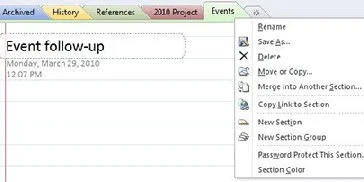
Easily work with sections using the right-click menu:
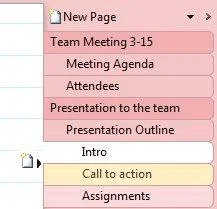
Flexible page tabs give you two levels of subpages, with names indented from the left for ease of organization. You can drag and drop to create new subpages.
Like a filing cabinet, only better
You can grab any snippet of information you want (links, images, text) from the web, another software app, an email—pretty much any electronic source—and drop it right on your OneNote page.
Want to record a lecture by your history professor (with her permission, of course)? OneNote makes it easy! Then you’ve got the audio right there in your notebook to back up any text notes you’ve taken.
With OneNote, you can type notes or write them by hand.
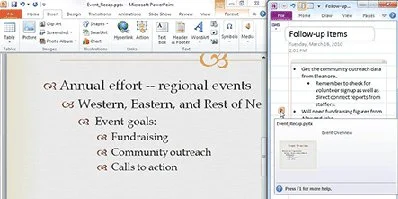
Working on a Word document or PowerPoint presentation? Dock OneNote on the side of your screen and keep notes, action items, and follow up questions in one spot. OneNote adds a clickable icon in the margin beside your linked notes so you can later open the source file and jump straight to the paragraph, slide or web page that you were working on when you took the note.
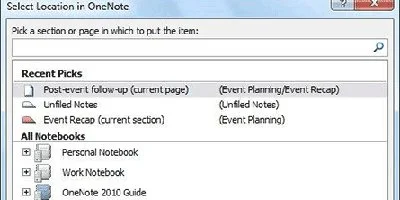
What if you have a project that has lots of parts, like a Word document, web pages, images, and slides. How do you keep it all organized? With Quick Filing you can send your information to the right place, fast. When you take a screen clipping from OneNote, send an Outlook email message to OneNote, start a linked note taking section (described above), or send to OneNote from a document, Quick Filing lets you choose the spot to put that content.
Find what you need really fast
Where's that note about window measurements? Or that picture you took of those brand name jeans? Or the recorded meeting you and your professor had?
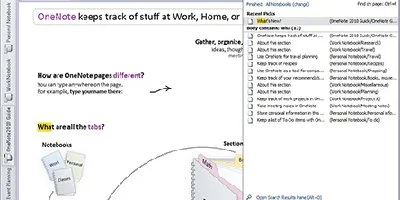
As soon as you begin typing what you are looking for, OneNote shows you where to find it. OneNote searches your written text, text within images, and keywords in the audio and video recordings that you include in your notebooks. You can search all of your notebooks at once, or just search within individual pages, sections or notebooks.
Microsoft OneNote 2010
 4 instalments of
£17.49 with clearpay
4 instalments of
£17.49 with clearpayQuantity:
Delivery & Returns
If I'm not completely happy with my item?
All Customer Reviews
There are currently no reviews.